



 ChatGPT
 Claude
 Grok
 Gemini
 Perplexity
PDF gift cards in WooCommerce give customers something they can download, print or forward, with a code that works at checkout. GiftRocketWP includes PDF gift cards in the free plugin. This post shows what the PDF can contain, how you can style it, and what a shop owner gains from a card that looks professional.
The details below follow the WordPress.org plugin page and the GiftRocketWP features page.
In this post
- Why PDF gift cards in WooCommerce are worth offering
- What a GiftRocketWP PDF gift card contains
- QR code, barcode or PDF417: which one to use
- Style the PDF to match your brand
- How customers receive and find the PDF
- Common PDF problems
- FAQ
Why PDF gift cards in WooCommerce are worth offering
An email with only a code is easy to miss. A PDF looks like a real gift card. The buyer can print it and hand it over, and the recipient can save it. For the store owner, that can make a digital product feel more like a gift.
PDF gift cards in WooCommerce: what the owner gets
- A more valuable product. A designed card feels worth the price.
- Printable gifts. Buyers who want something to hand over in person can print it.
- Easy to re-download. Customers can download the PDF again from My Account, which may reduce lost-code requests.
- No extra plugin. PDF gift cards are included in the free plugin.
What a GiftRocketWP PDF gift card contains
Per the plugin page, a PDF gift card can show:
- The recipient and sender details, and a formatted multi-line gift message.
- The gift card code and balance information.
- A redemption QR code, so a scan applies the card in the cart.
- A barcode or PDF417 code.
- A wallet pass QR code, if you use a wallet provider. ePasscard is free for up to 50 live passes, then paid.
QR code, barcode or PDF417: which one to use
| Code type | Good for |
|---|---|
| QR code | Customers scanning with a phone to redeem online. |
| Barcode | Stores that also scan codes with a barcode reader. |
| PDF417 | A denser code that fits more data in a small space. |
All three are optional, so you can show only what your store needs. If you sell only online, a QR code is usually enough. When a customer scans the redemption QR code, the card is applied to the cart.
Style the PDF to match your brand
The free plugin includes PDF customization with layouts, colors, typography and styling controls. A practical way to set it up:
- Open GiftRocketWP, then Settings, and open the PDF template appearance settings (the tab label can differ between versions).
- Pick a layout, then set colors and fonts that match your site.
- Add the code type you want, such as a QR code.
- Place a test order and open the PDF on your phone and on a desktop screen.
- Check that a long message and a long name still fit on the card.
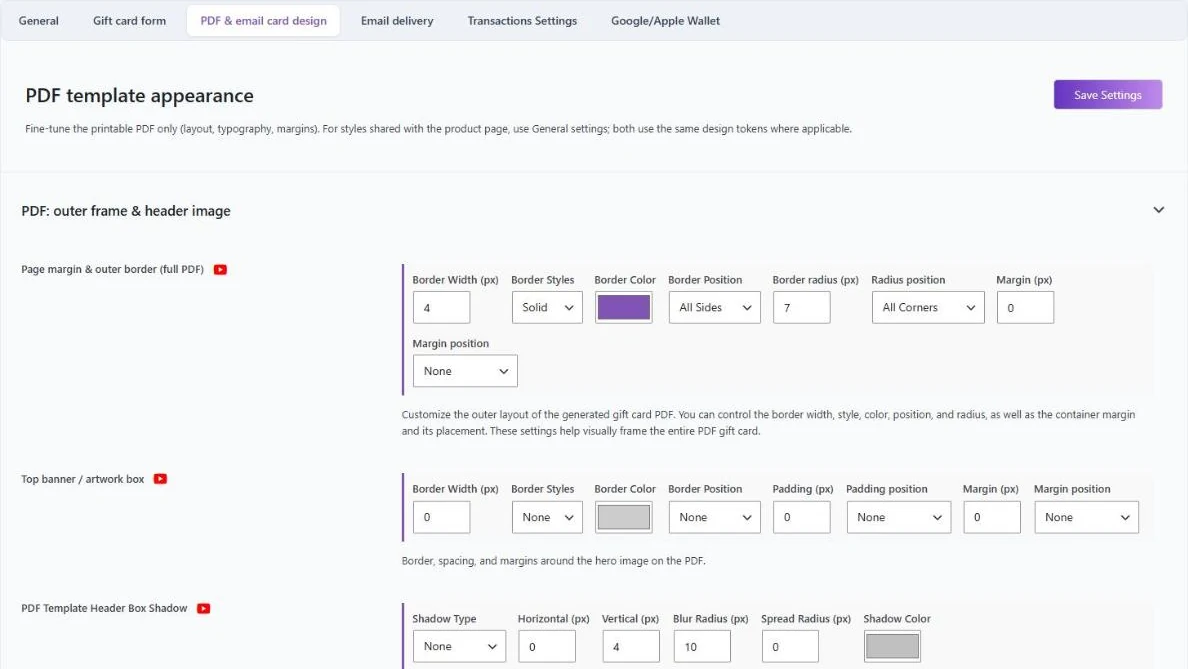
Use the message length controls so long messages do not break the layout.
How customers receive and find the PDF
The PDF can go out with the gift card email, and customers can download it from My Account, per the plugin page. Pair it with scheduled delivery so the card arrives on the day the buyer chose. For store setup basics, see how to sell gift cards in WooCommerce.
Common PDF problems
- Long names or messages. Lower the message length limit in the product fields (the plugin lets you set it), then open the PDF from a test order.
- Layout on a phone. Open the PDF on a phone and on a desktop viewer before you launch.
- Customer lost the file. Buyers can download the PDF again from My Account, Gift Cards.
FAQ
Are PDF gift cards in WooCommerce free with GiftRocketWP?
Yes. PDF gift cards are included in the free plugin.
Can I add a QR code to the PDF?
Yes. QR code, barcode and PDF417 are optional, and a redemption QR code applies the card to the cart when scanned.
Can customers download the PDF again?
Yes. Per the plugin page, customers can download the PDF from My Account.
Can I change the PDF design?
Yes. You can adjust layouts, colors and typography, and the plugin also has a design gallery for the gift card itself.
Create your PDF gift cards
Install the free GiftRocketWP plugin, or see GiftRocketWP for WooCommerce.