



 ChatGPT
 Claude
 Grok
 Gemini
 Perplexity
Personalized gift cards in WooCommerce feel like a gift, not a coupon. A buyer picks a design, adds a name and a message, and the recipient gets something that looks made for them. For a store owner that can mean higher perceived value and a card that people want to share. This post shows what GiftRocketWP offers for personalization, what is free and what needs Pro.
In this post
- Why offer personalized gift cards in WooCommerce
- Free personalization: designs, names and messages
- Pro personalization: images, presets and AI help
- What a shop owner gets
- Tips for a clean setup
- FAQ
Why personalized gift cards in WooCommerce sell better
A plain code in an email looks like a receipt. A card with a design, the sender’s name and a short message feels like a present. Buyers also spend less time wondering what to write when the product page guides them.
You do not need design skills. GiftRocketWP ships a design gallery and live preview, and the free plugin covers the basics. See the free and Pro features page for the full list.
Free personalization: designs, names and messages
Per the plugin’s feature list and the WordPress.org plugin page, the free plugin includes:
- A design gallery with image, solid-colour and gradient designs, and a live preview on the product page.
- Recipient, sender and message fields, with custom labels and length limits.
- Several cards from one product page, with quantity limits, so a buyer can send cards to a few people at once.
- PDF gift cards with layouts and styling, plus a QR code, barcode or PDF417 code.
- Scheduled delivery, so the personal message arrives on the right day. See how to schedule gift card delivery in WooCommerce.
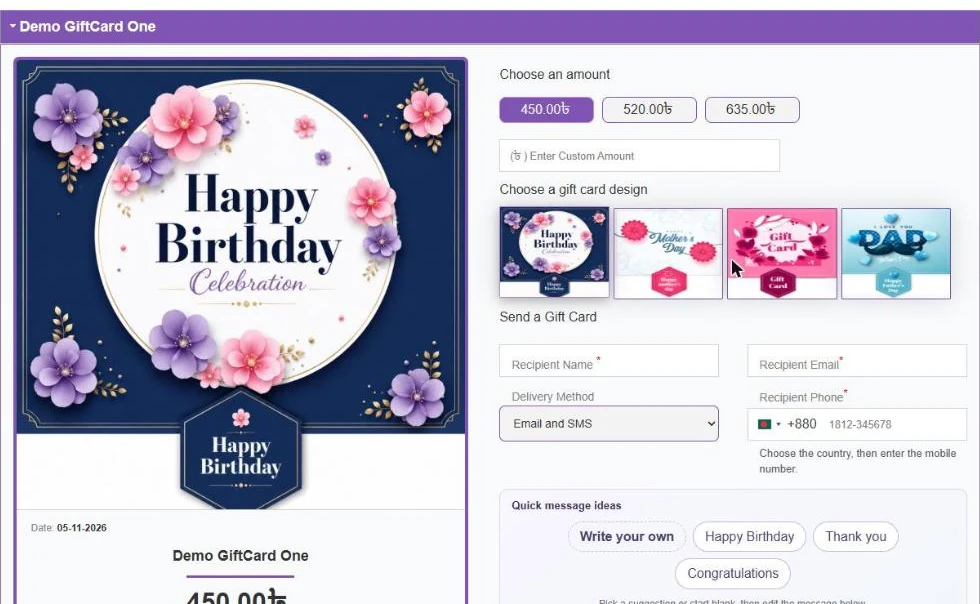
Personalized gift cards in WooCommerce: keep the form short
Each extra field is one more chance to lose a buyer. Keep recipient name, sender name and message. Use the length limits to keep messages short, then open the PDF from a test order to check the layout.
Pro personalization: images, presets and AI help
Pro adds three personalization features. We did not test Pro for this post, so check each one in your own store.
| Pro feature | What it does for the buyer | What it means for you |
|---|---|---|
| Buyer image upload | Adds their own photo to the card. | Optional ClamAV scanning and auto-cleanup, per the feature list. |
| Greeting presets | Picks a ready-made message. | Saves the buyer from a blank message box. |
| AI writing assistant | Suggests, improves or translates a greeting. | Uses your own OpenAI, Anthropic, Gemini or OpenRouter key, so you pay the API cost. |
The AI assistant works with a daily credit pool: 80 in total, 30 for admin and 50 for the storefront, per the feature list. It can also help you with admin emails and product copy.
What a shop owner gets
- Higher perceived value. A designed card looks worth more than a code.
- Fewer surprises. A live preview shows the buyer what the card will look like before checkout.
- Brand control. You choose the designs, so every card fits your shop.
Tips for a clean setup
- Pick three to six designs that match your brand and the main gifting occasions.
- Set sensible minimum and maximum amounts, or use preset values.
- Place a test order and open the email and the PDF on a phone.
- If you allow image upload, set a clear file policy and enable scanning if you can.
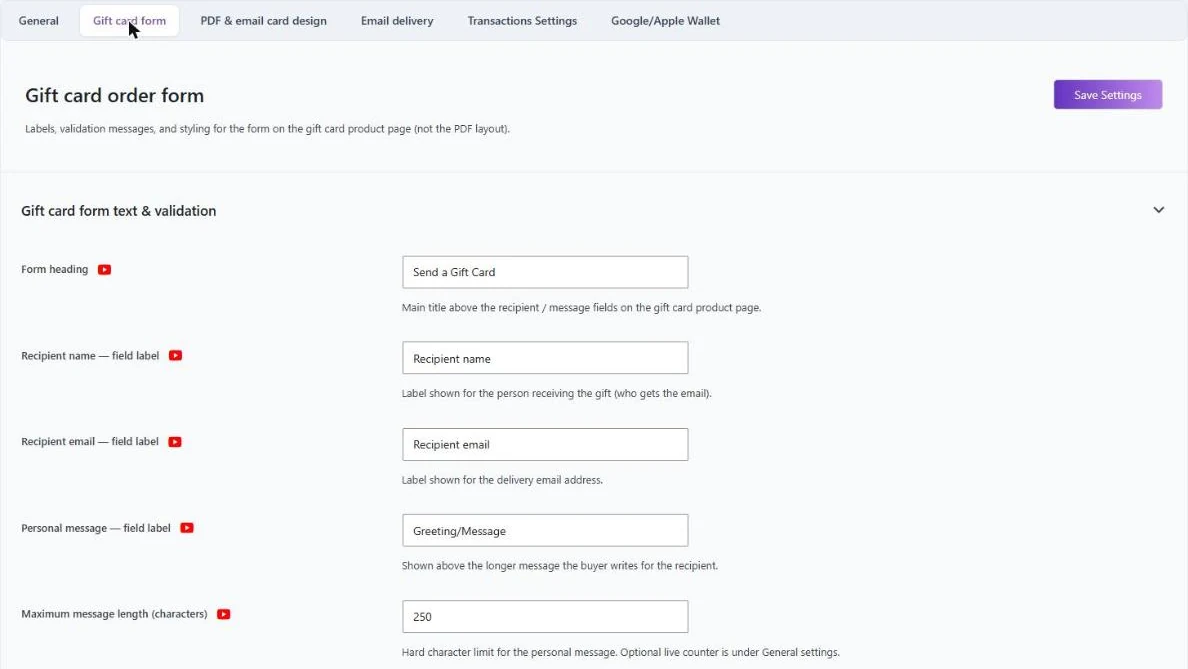
For setup basics, read how to sell gift cards in WooCommerce.
FAQ
Can I offer personalized gift cards in WooCommerce for free?
Yes. The free GiftRocketWP plugin has a design gallery, recipient, sender and message fields, and PDF cards.
Can buyers upload their own image?
Yes, with Pro. It supports optional ClamAV scanning and auto-cleanup.
Does the AI greeting writer cost extra?
The AI writing assistant is a Pro feature. It uses your own API key from OpenAI, Anthropic, Gemini or OpenRouter, so any cost comes from that provider.
Can I limit message length?
Yes. The free plugin lets you set length limits on the message fields.
Make your gift cards personal
Install the free GiftRocketWP plugin, or see GiftRocketWP for WooCommerce.
