



 ChatGPT
 Claude
 Grok
 Gemini
 Perplexity
Reloadable gift cards in WooCommerce let a customer add money to the same card again instead of buying a new one. For a store owner that means repeat purchases without a new code each time. GiftRocketWP Pro adds this with top-up products. This post explains how a gift card top-up works, what the customer sees, and what you gain.
Balance top-up is a Pro feature, per the GiftRocketWP features page and the plugin’s feature list. We did not test Pro for this post, so check each setting in your own store before you promote it.
In this post
- What are reloadable gift cards in WooCommerce?
- Why reloadable gift cards help a shop owner
- How the gift card top-up works in GiftRocketWP Pro
- Optional bonus value on top-ups
- Track balances and liability
- FAQ
What are reloadable gift cards in WooCommerce?
A normal gift card has a fixed amount. When the balance reaches zero, the card is done. A reloadable gift card keeps its code and lets the owner add more value later. Think of a coffee shop card that you top up each month. The same idea works for an online store that people visit often.
If you have not set up gift cards yet, start with our guide to selling gift cards in WooCommerce, then add top-up.
Why reloadable gift cards help a shop owner
Reloadable gift cards in WooCommerce: repeat customers with less friction
A customer who already holds a card can add value to it instead of buying a new one. That can mean fewer new codes and emails to keep track of.
Value is meant to be spent in your store
Value loaded onto a card is meant to be spent in your store, which can give customers a reason to return.
Gifts that keep giving
Depending on how you set up the top-up form, a gift giver may be able to reload a card the recipient already holds, so test this in your store before you promote it. That suits recurring gifts, such as a monthly allowance for a teen or a loyalty top-up for a regular customer.
Less admin work for you
You do not create a new card for every payment. One card and one balance carry the history.
How the gift card top-up works in GiftRocketWP Pro
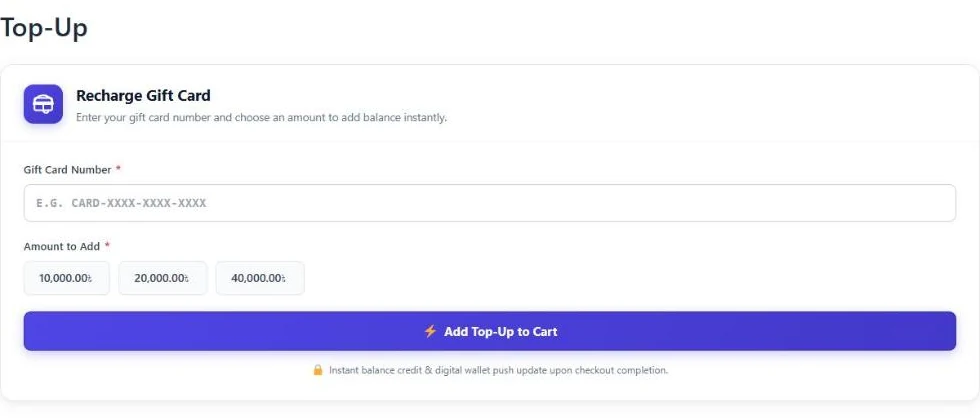
Per the plugin’s feature list, Pro adds top-up (reload) products with a [wallregi_topup] shortcode, plus a transactions and balance lookup portal. In general terms the flow is below. Exact screens can differ by version, so run a test order first.
- You set up the top-up product and place the top-up form on a page.
- The customer identifies the card to reload and chooses an amount.
- They check out as usual.
- The amount is added to the card balance and shows in the transaction history.
| Feature | Edition |
|---|---|
| Sell gift cards, scheduled email delivery, PDF cards | Free |
| Redeem at cart and checkout, classic and Blocks | Free |
| Top-up / reload products | Pro |
Transactions and balance lookup portal ([wallregi_transactions]) | Pro, advanced lookup |
| Bonus value tiers | Pro |
Optional bonus value on top-ups
Per the Pro changelog, Pro 1.0.7 adds bonus value, and the settings decide how tiers are configured. Check in your own store whether a tier applies to top-up products. Bonus value needs the free plugin at version 1.1.4 or newer. A bonus is a simple way to encourage a larger top-up, for example “load a larger amount and get extra on your card”. Set the amounts so the offer is profitable for your margins, and check the result with a test order.
Track balances and liability
An unspent balance is money you owe in goods. Per the feature list, Pro includes an outstanding balance export as a CSV, so your accountant can see what is open. Customers can also check their own cards and transactions on a My Account screen.
For fraud, the free plugin includes rate limits and a security audit log table. This is general information, not financial or legal advice, so confirm how your region treats stored value.
FAQ
Can I make reloadable gift cards in WooCommerce?
Yes, with GiftRocketWP Pro. It adds top-up products so a customer can add value to an existing card.
Is gift card top-up free or Pro?
Top-up is a Pro feature. The free plugin sells and redeems gift cards.
Can customers see their balance?
Yes. Customers can see their cards and transactions in My Account, and Pro adds a balance lookup portal.
Can I add a bonus to a top-up?
Per the Pro changelog, Pro 1.0.7 supports bonus value on top-up products. It needs the free plugin at 1.1.4 or newer.
Add top-up to your gift cards
Start with the free GiftRocketWP plugin, then see Pro features. For an overview, visit GiftRocketWP for WooCommerce.
