



 ChatGPT
 Claude
 Grok
 Gemini
 Perplexity
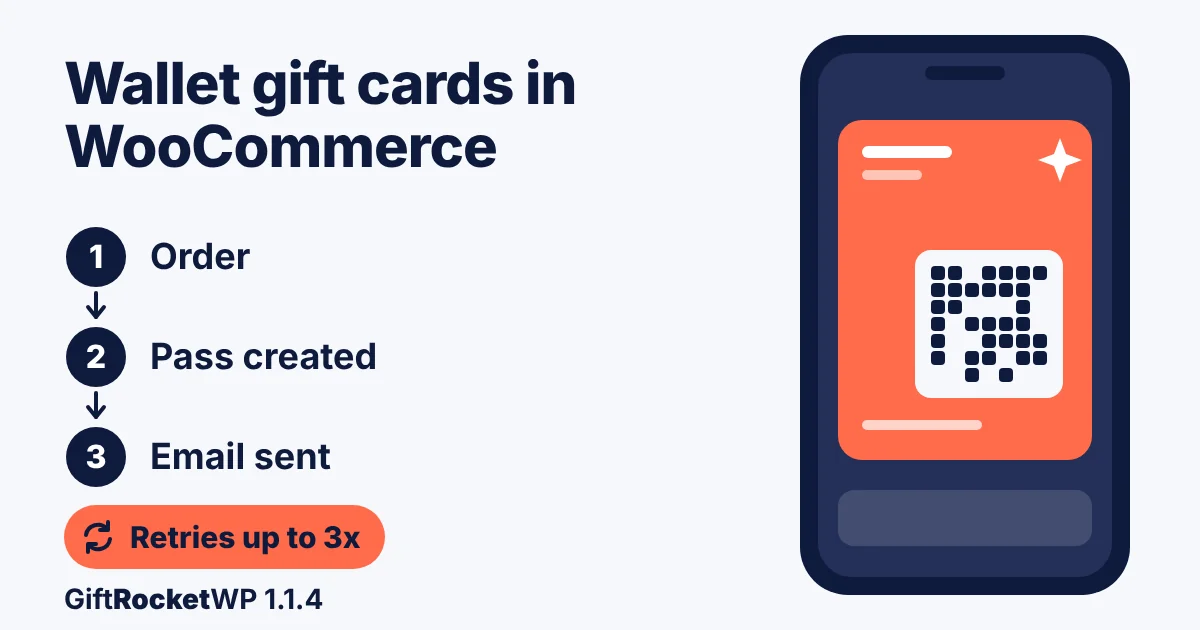
If you use ePasscard for an Apple Wallet gift card in WooCommerce, GiftRocketWP 1.1.4 holds the gift card email until the pass exists, and a pass that fails at issuance is retried.
This needs an API key and a pass template. This post covers what changed in 1.1.4 (free, October 23, 2026). For setup, see our guide to setting up Apple Wallet gift cards in WooCommerce.
Passes need a provider: ePasscard (free for up to 50 live passes, then paid, see pricing) or GiftToWallet (not tested; check its page for cost).
Pro news is below (per the Pro changelog, not tested). Free changes are on the WordPress.org plugin page.
In this post
– What’s new in 1.1.4 at a glance
– Apple Wallet gift cards in WooCommerce: the email waits for the pass
– When pass creation fails, and what to do
– The WooCommerce gift card PDF QR code
– Hide the gift card field on WooCommerce checkout, or show it
– 1.1.4 fixes: WooCommerce inactive, date format, line breaks and ePasscard errors
– For developers: the bonus amount hook
– GiftRocketWP Pro 1.0.7: WooCommerce gift card bonus value tiers and SMS
– Pro 1.0.7 at a glance
– Bonus value on gift card products
– SMS, top-up bonus and redemption fixes
– How we tested this
– Updating to 1.1.4
– FAQ
– Get GiftRocketWP 1.1.4 for WooCommerce
What’s new in 1.1.4 at a glance
All nine changelog items are in the free plugin.
| Change | Where to find it |
|---|---|
| Show or hide the gift card field on Cart and Checkout | GiftRocketWP > Settings > General Settings > Essential options |
| Gift card email waits for the wallet pass (SMS too, with Pro) | Scheduled Deliveries > Email Status |
| Up to 3 automatic retries for a pass that fails at issuance | Order notes |
| PDF QR code that links to the pass | General Settings > BarCode Settings |
| Bonus hook for developers | Your own code |
| Setup screen when WooCommerce is inactive | GiftRocketWP admin page |
| Date-format fix for scheduled delivery (changelog: “Send now”) | Send At field |
| Line breaks kept in personal messages | Thank-you page, checkout summary, PDF, order email |
| Clearer ePasscard error messages | Google/Apple Wallet tab |
Wallet pass rows need a provider; cost applies.
Apple Wallet gift cards in WooCommerce: the email waits for the pass
With a provider active (ePasscard: free up to 50 live passes, then paid), the flow is, as seen in our simulated test:
- The customer buys a gift card and GiftRocketWP creates it, with a code and a balance.
- GiftRocketWP asks the provider to create the Apple Wallet and Google Wallet gift card pass for that card.
- If the pass exists, the email (and, with Pro, SMS) goes out.
- If not, the delivery is held. Scheduled Deliveries > Email Status shows “Waiting for wallet pass”, and an order note says the email goes out as soon as the pass exists.
- When a pass appears, the held message is released at once.
A delivery only waits when all of these are true:
- ePasscard is the provider and an API key is saved (or GiftToWallet, untested);
- a pass template with mapped fields is set;
- the card has no pass yet and is not cancelled or expired;
- the message is pending or sending, and is not an admin re-send.
With no provider, or wallet passes off, nothing waits; the email went out at once in our test.
When pass creation fails, and what to do
1.1.4 retries a pass that fails at issuance (ePasscard: free up to 50 live passes, then paid) up to 3 times, 5 minutes apart, through Action Scheduler (or WP-Cron if it is unavailable). No retry is scheduled when the provider’s outcome is unknown; the order note then says to check the pass service.
| State | What you see | What happens next |
|---|---|---|
| A retry succeeds | Order note: “Wallet pass … created on automatic retry N” | The held email is released |
| All retries fail | Order note: use “Generate pass” on the gift card dashboard | The email keeps waiting |
| You use “Generate pass” | A pass is created | The held email is released |
| You use “Re-send email” | Email goes out | Admin re-sends are never held |
If a pass is never created, the email is not sent; it stays in “Waiting for wallet pass” until a pass exists, you switch the provider off, or the card no longer needs one. In our test the waiting state showed in Email Status, the dashboard row and a private order note; we found no admin notice or Security Log entry. If an email goes missing:
- Check Email Status and the order note.
- Use Generate pass. If that fails, check the API key and wallet settings.
The WooCommerce gift card PDF QR code
1.1.4 adds QR options that link a PDF gift card to its wallet pass. Per the readme, recipients scan the QR to add the pass to Apple or Google Wallet. The provider cost applies (ePasscard: free up to 50 live passes, then paid).
Find it at GiftRocketWP > Settings > General Settings > BarCode Settings > “Barcode, QR, or PDF417 on PDF”. The new choices are “QR code (wallet pass link)” and “Barcode and QR code (wallet pass link)”, listed only when a wallet provider is active or saved.
With a pass link, the QR encodes it (we decoded a rendered PDF and got our placeholder link). With no pass yet, it encodes the apply link.
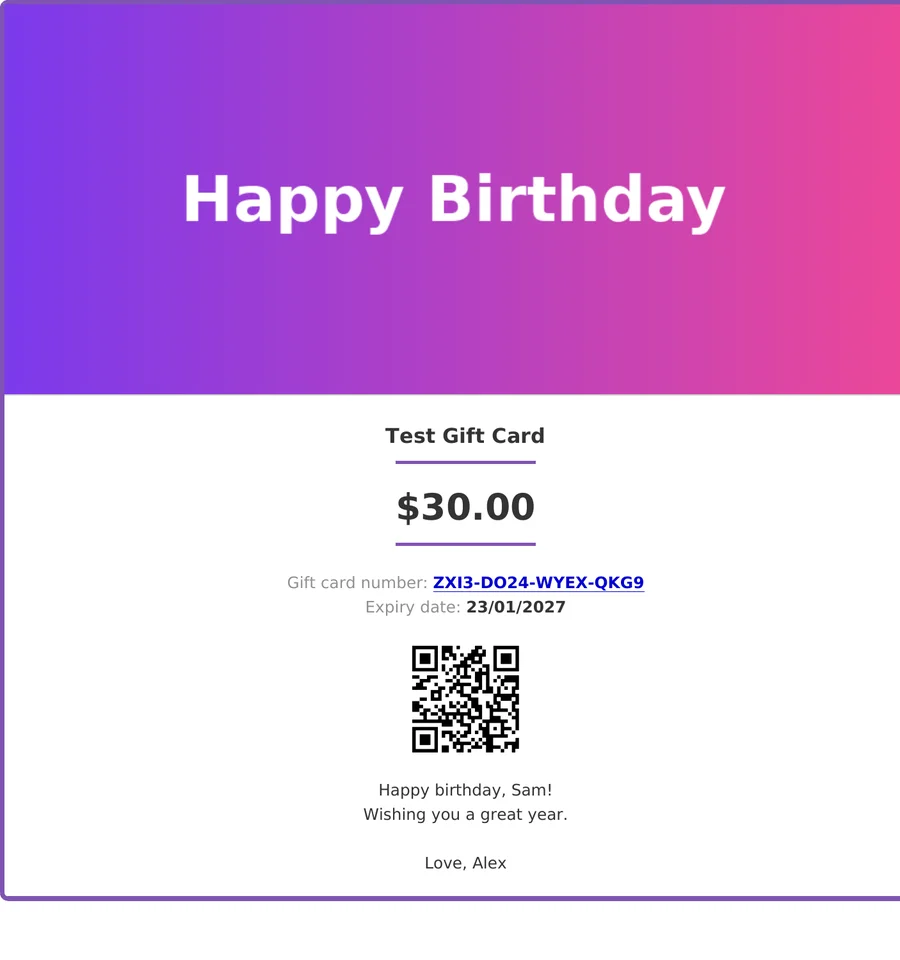
A test card ($30.00, from a bonus-hook test) from our local store. The QR encodes a placeholder link, not a real pass.
Hide the gift card field on WooCommerce checkout, or show it
1.1.4 adds separate switches for the gift card code field on Cart and Checkout. They work on Classic and Blocks pages and are on by default.
- Go to GiftRocketWP > Settings > General Settings > Essential options.
- Switch “Gift card field on cart page” on or off.
- Switch “Gift card field on checkout page” on or off, then save.
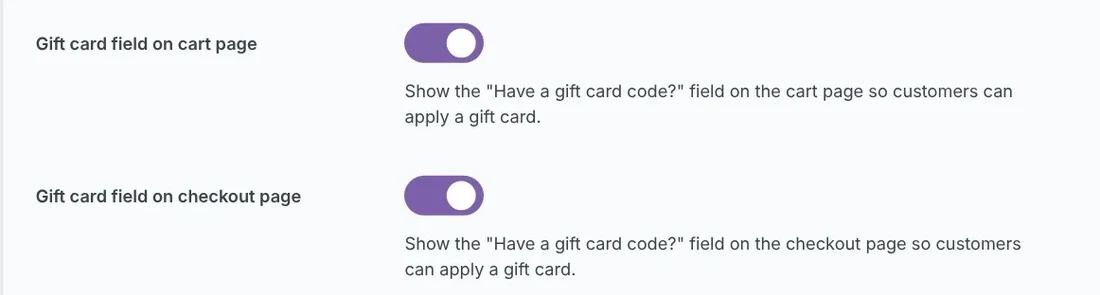
The two toggles, found under Essential options, both on, which is the default.
We tried all four combinations on block and classic pages, and the “Have a gift card code? Use it here” field followed them.
The tradeoff. With the field hidden, customers cannot type a code but can still redeem through QR code or PDF links, per the readme. With both toggles off, a link like /checkout/?wallregi_apply_giftcard=CODE showed “Gift card applied successfully.” and the order completed. The setting Page for "apply gift card" links and QR codes decides whether links land on Checkout (the default) or Cart.
Caveat for classic pages. A classic shortcode page that is not WooCommerce’s configured Cart or Checkout page showed no field in our test when the configured page was a block page.
1.1.4 fixes: WooCommerce inactive, date format, line breaks and ePasscard errors
- WooCommerce inactive. No fatal error. The plugin shows a “WooCommerce first” setup screen with an “Activate WooCommerce” button.
- Date format and “Send now”. The changelog says: “Fixed ‘Send now’ instant delivery delays caused by site date-format parsing.” We found no “Send now” button; a blank “Send At” sends at once. At function level, a non-default date format (d/m/Y) made 1.1.3 lose the chosen date, and 1.1.4 parsed it correctly.
- Line breaks in messages. Personal messages keep their line breaks on the thank-you page, checkout summary, PDF and order email (HTML). The product page preview shows no message text.
- ePasscard errors. The changelog lists clearer error messages in the wallet settings. They include ePasscard’s own text, such as “The ePasscard API returned an error (HTTP N)” followed by its message. We read these in the code only.

The setup screen shown when WooCommerce is not active.
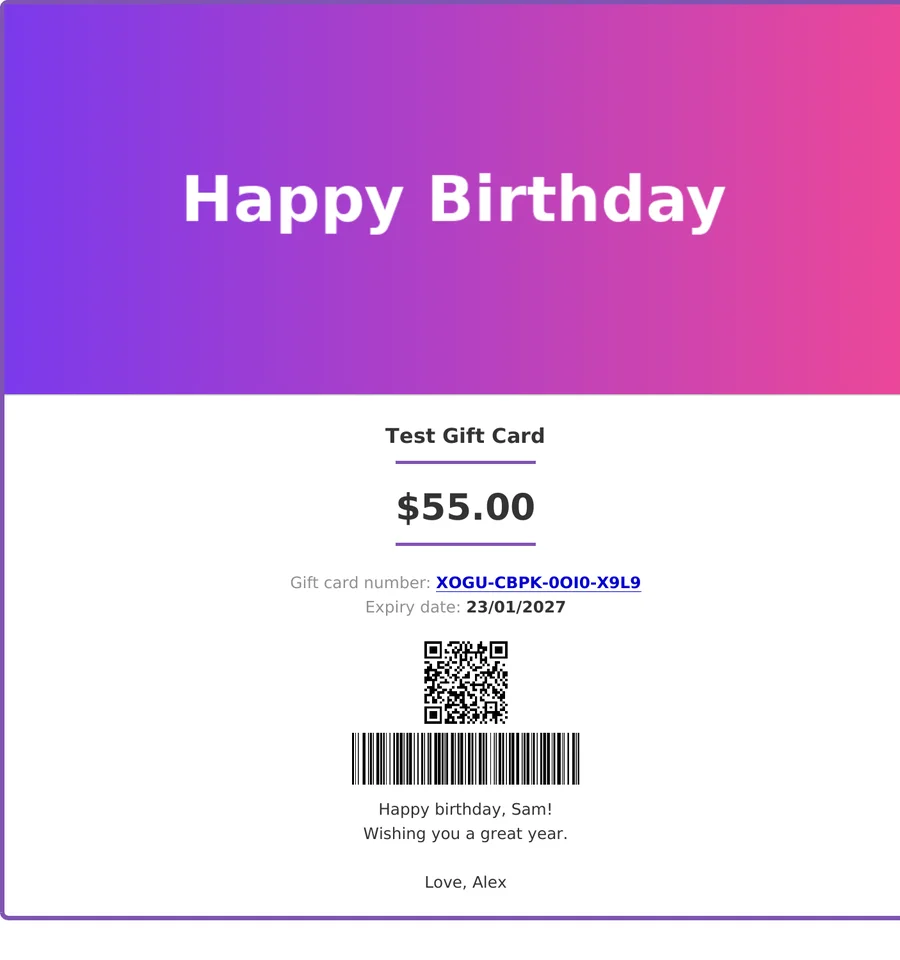
A test PDF ($55.00 from the bonus-hook test) where a multi-line message keeps its line breaks. The QR is a local test link and the barcode is test data.
For developers: the bonus amount hook
1.1.4 adds a filter, wallregi_issue_giftcard_bonus_amount, for bonus value when a card is created. The plugin calls it like this:
// How the plugin calls the filter (for reference)
apply_filters( 'wallregi_issue_giftcard_bonus_amount', 0, $paid_amount, $face_value, $item, $order );
Return a number above 0 and it is added to the card’s starting and current balance, once per card item. A minimal example, tested on our local store:
add_filter( 'wallregi_issue_giftcard_bonus_amount', function ( $bonus, $paid, $face, $item, $order ) {
    return $bonus + 5;
}, 10, 5 );
It gives every card a 5 bonus, so change it before live use. Put it in a small custom plugin or child theme, not in the plugin’s own files. The Pro changelog does not say whether Pro uses this hook, so if you run both, test a bonus order first. In our test a $50 test card became 55.00 and the buyer paid $50.00. At the time of writing (October 23, 2026), the developer guide does not list this hook.
GiftRocketWP Pro 1.0.7: WooCommerce gift card bonus value tiers and SMS
This section follows the Pro changelog (“Wallet Ready Gift Cards for WooCommerce Pro by GiftRocketWP”), which lists these changes under Pro 1.0.7. We did not test Pro.
Pro 1.0.7 at a glance
None of these is in the free 1.1.4 changelog. See the Free and Pro features page for what each edition includes.
- Bonus value tiers on gift card products.
- SMS in Pro, top-up bonus and two redemption fixes.
Bonus value on gift card products
Pro 1.0.7 needs free 1.1.4 or newer for Bonus value; with an older free plugin it stays off and the product screen shows an update notice.
- Tiers are set per product as
amount | bonus. The bonus is a percentage (5%) or a fixed amount (500), for “the amount or more” or “exactly the amount”, with optional start and end dates. - The shopper pays the chosen amount. The card, its email, PDF and wallet pass carry amount plus bonus, and cart and checkout show “Gift card value”.
- Tiers are saved on the order line, so changing a campaign leaves cards already sold unchanged.
- The bonus is worked out from what was actually paid, after coupons. By default the part paid with gift cards earns no bonus.
SMS, top-up bonus and redemption fixes
- SMS delivery is part of Pro (it was a separate add-on). Gift cards can be sent by SMS through Twilio, and the buyer chooses email, SMS or both. It works while the Pro license is active.
- If you used the SMS add-on: your SMS settings are kept. Pro deactivates the add-on once, and it can then be deleted.
- Bonus value on top-up products, with fixed bonus amounts only. The top-up form lists the tiers, and refunds take the bonus back in proportion.
- Two redemption fixes: a card added after “Maximum combined gift card redemption per order” was reached no longer shows “Gift card applied” without a discount, and the “Let buyers choose how much to redeem” popup now accepts only what is left to pay for a second card.
How we tested this
We ran free 1.1.4 on a local test store (WordPress 7.1.3, WooCommerce 11.2.1). No request left the machine; mail was captured locally.
- Run in the admin and on the storefront: toggles, setup screen, line breaks, PDF QR option, bonus hook.
- Simulated: retries and the wait. We read the code and stubbed the pass call to fail, so the real ePasscard retry path did not run.
- Placeholder: a fake pass link in the QR; no phone scan.
- Function level only: the date-format fix.
- Code read only: the ePasscard error messages and the GiftToWallet filter (the add-on itself was not tested).
- Not tested: a live pass, real email delivery, scheduled sends through the date picker, SMS and Pro.
Updating to 1.1.4
- Back up your site. Requirements: WordPress 6.5+, PHP 8.1+, WooCommerce. If you skipped 1.1.3, see what changed.
- Update the free plugin. In our test the admin menu read “GiftRocketWP” (1.1.3 read “GiftRocket”). Pro 1.0.7 needs free 1.1.4 or newer for Bonus value (see the Pro section).
- Check GiftRocketWP > Settings > General Settings > Essential options. Both field toggles are on by default.
- If you use wallet passes (provider cost applies), check the provider, API key and pass template on the Google/Apple Wallet tab. Choose a “(wallet pass link)” option for the PDF QR if you want it.
- Place a test order and check Email Status.
FAQ
Short answers to the questions store owners ask most about wallet gift card delivery in GiftRocketWP 1.1.4.
Do Apple Wallet gift cards make the email wait?
Yes, but only when a provider with an API key and a pass template are set up. Without that, nothing waits and the email goes out as usual. See the conditions.
How many times does GiftRocketWP retry a pass that fails at issuance?
Up to 3 times, about 5 minutes apart. If the provider’s outcome is unknown, no retry is scheduled. See when pass creation fails.
Can I hide the gift card field on the cart but not on checkout?
Yes. The cart and checkout toggles are independent, and customers can still redeem with QR code or PDF links. See how to hide the field.
Do I need an Apple Developer account?
Not if your provider signs the passes for you. ePasscard’s WordPress.org page says “No. EpassCard signs and delivers the passes for you.”
Are Apple Wallet and Google Wallet gift cards free in WooCommerce?
It depends on the provider. ePasscard is free up to 50 live passes, then paid (pricing). Your plan sets how many live passes you can have at once, and deleting a pass frees its slot. For GiftToWallet, check its page.
Which features need Pro?
None of the nine free 1.1.4 changes need Pro. SMS delivery is part of Pro, so the SMS side of the wait matters only if you use it (we did not test it). Pro 1.0.7 is covered in its own section.
Get GiftRocketWP 1.1.4 for WooCommerce
Install the free plugin from WordPress.org or see GiftRocketWP for WooCommerce. Wallet passes need a provider; ePasscard is free up to 50 live passes, then paid. New to gift cards? Read how to sell gift cards in WooCommerce for the full setup.
Looking at the next release? GiftRocketWP 1.1.5 adds WooCommerce gift card sender name options: buyer, billing name, a custom name or none.
