


 ChatGPT
 Claude
 Grok
Grok
 Gemini
 Perplexity
GiftRocket 1.1.3 makes gift card amounts follow your WooCommerce decimal settings everywhere. A $25.75 gift card now stays $25.75, from purchase to the last cent of redemption. Your existing gift cards are upgraded automatically when you update.
This release also adds a way to refund part of a gift card payment, holds the card balance while a customer retries a failed payment, and closes a loophole that let gift cards into the cart without a recipient. Pro, GTW and SMS get matching updates.
Why Decimal Precision Matters
In earlier versions, gift cards defaulted to whole integer values unless specifically formatted. For stores running promotions with odd amounts, percentage discounts, or currencies that configure 2 or 3 decimal places, rounding differences could occur.
With 1.1.3, every calculation from cart line items to checkout balance deductions strictly respects WooCommerce’s decimal precision setting. Whether you sell a $25.75 card or redeem $14.33 against an order, every cent remains fully accounted for without rounding discrepancies.
If you are new to configuring digital gift cards for your store, see our guide on how to set up WooCommerce gift cards for mobile wallets.
What’s New in GiftRocket 1.1.3
Exact amounts, down to the cent. Gift card values now follow WooCommerce’s “Number of decimals” setting in every place they appear: the product page, cart, checkout, admin screens and bulk import. Before, a $25.75 card could be saved as $26, and a $25.75 checkout deduction could leave a rounded balance. Stores that sell whole amounts only see no change.
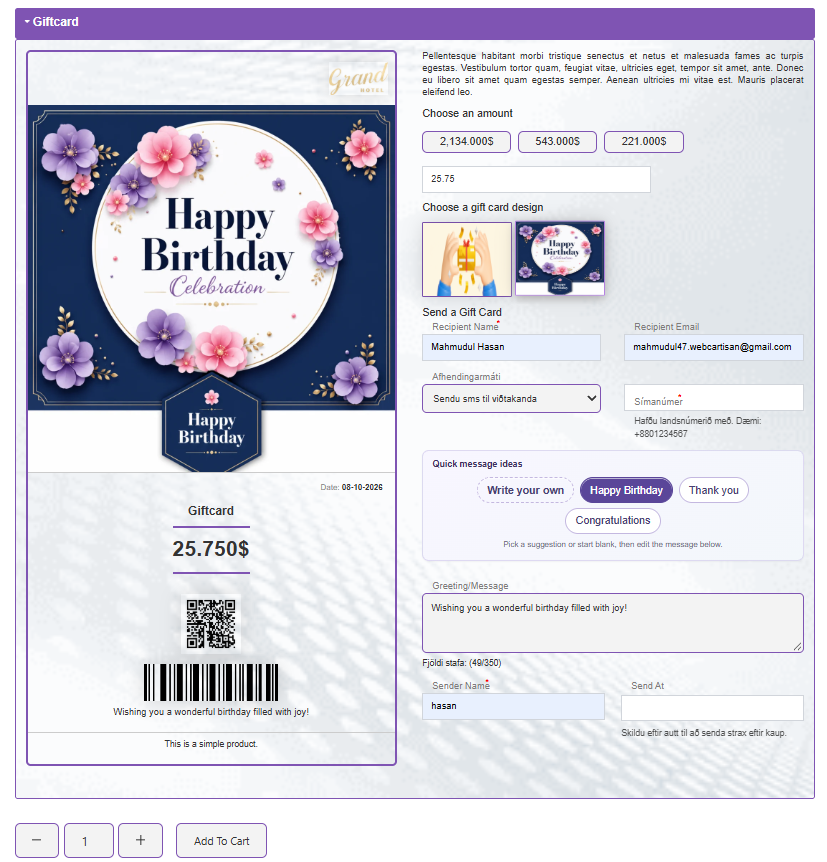
Gift card product page displaying exact decimal amount ($25.75) and live card preview.
Restore to gift card for partial refunds. On a paid order that used a gift card, you can now give back part of the gift card payment from the order screen. Use it when a customer returns one item from an order they paid for with a gift card.
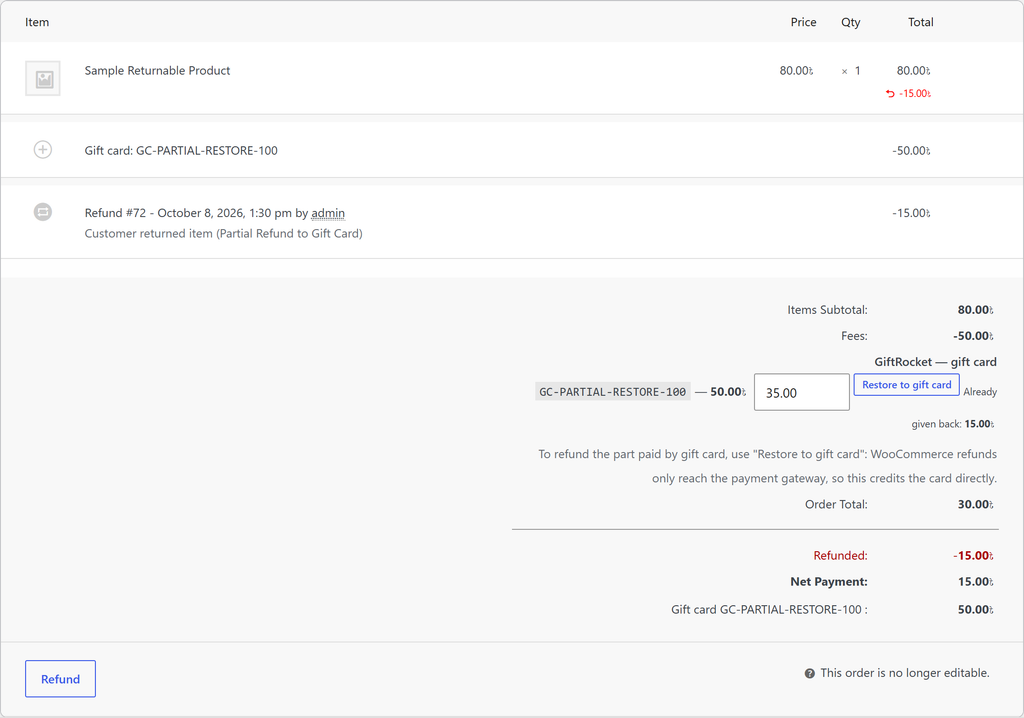
The “Restore to gift card” button on the WooCommerce order screen with “Already given back” tracking.
Failed payments keep the balance for a retry. When a payment fails, the gift card amount stays reserved so the customer can try again. If the order is still unpaid after 24 hours, it is cancelled and the amount goes back to the card. You can change the 24 hours under gift card settings.
No more gift cards without a recipient. Gift card products can only be added to the cart through the gift card form. Direct add-to-cart links and other plugins can no longer add a gift card with no amount or recipient.
Gift card page works with more themes. The single gift card page now shows your theme’s header and footer once, on classic themes like Astra and on block themes like Twenty Twenty-Five.
Translations load. The bundled Arabic and Spanish translations now work, alongside any from translate.wordpress.org.
Pro 1.0.6. Pro 1.0.6. Top-ups follow the same decimal rules and are reversed proportionally on partial refunds. The outstanding balance export now handles large stores in batches. Check out all GiftRocket Pro features or explore SMS delivery for instant balance updates.
Fixes
- Custom amounts like 30,50 are read correctly on stores that use “.” as the thousands separator (they were added to the cart as 3.050,00).
- Preset amounts with decimals are read correctly on the product form.
- Admin gift card create and edit, and the cart edit popup (classic and block cart), accept amounts with decimals.
- If a gift card’s transaction history can’t be saved, the balance change is undone, so balance and history always match.
- No more PHP warning on the dashboard when a gift card has no expiry period.
- Code updated to pass the WordPress.org Plugin Check (escaping, input sanitizing, database queries, translations).
Before You Update GiftRocket 1.1.3
- Back up your site. The first time 1.1.3 loads, it converts gift card amounts in the database to decimals. In our tests 50,000 gift cards converted in about 3 seconds with no values changed, but a backup is always wise.
- Update the free plugin first. Pro 1.0.6 needs GiftRocket 1.1.3 and shows a notice if the free plugin is older.
- Check the failed-payment hold. The default is 24 hours. Change it under GiftRocket settings if you want a shorter or longer hold.
How To Update
Go to Dashboard → Plugins and click Update now under GiftRocket. Pro, GTW and SMS update the same way once your license is active.
Community Feedback & Helpful Resources
Many of these decimal improvements, refund workflows, and edge-case fixes were shaped directly by feedback from store owners and our rigorous internal QA audits. Your bug reports and suggestions help us continuously refine GiftRocket for live WooCommerce stores worldwide.
If you encounter any formatting questions or need help configuring partial refunds for your checkout flow, our documentation and support channels are always open. Explore the resources below to get started with version 1.1.3.
Full changelog Documentation Support Forum Upgrade to Pro
Subscribe to the newsletter to get expert eCommerce tips that build strong customer loyalty. Follow the active development team on X and LinkedIn for valuable daily business updates. Join the WebCartisan community to share feedback, ask questions, and connect with other store owners.
Frequently Asked Question
Will updating to 1.1.3 change the balance on my existing gift cards?
No. Existing gift cards are automatically updated to match your WooCommerce decimal settings without changing their actual monetary value. In our benchmarks, 50,000 gift cards converted cleanly in about 3 seconds with zero discrepancies.
How does the partial refund to a gift card work?
When an order was paid using a gift card, a “Restore to gift card” button appears directly on the WooCommerce order edit screen. You can enter the exact partial amount to credit back to the gift card, and the screen tracks the remaining refundable balance.
What happens if a customer does not retry a failed payment?
The gift card balance remains reserved for 24 hours so the customer has time to retry checkout. If the order remains unpaid after 24 hours, the order is cancelled automatically, and the reserved balance is returned to the gift card. You can customize this holding period under GiftRocket settings.
Do I need to update GiftRocket Pro as well?
Yes. If you use GiftRocket Pro, upgrade to Pro 1.0.6 alongside the free plugin to ensure matching decimal support and proportionate partial refund calculations for card top-ups