




 ChatGPT
 Claude
 Grok
 Gemini
 Perplexity
GiftRocketWP Pro features add the tools a store needs once gift cards are selling: top-ups, bonus value, a balance lookup page, expiry reminders and exports for your books. The free plugin already covers selling, delivering and redeeming cards. Pro modules only load with a valid license. This post explains what Pro adds, in plain terms. We have not tested Pro end to end, so check the details against the screens shown here while the 40% Pro offer runs (Nov 11 to Nov 30, 2026).
The details follow the WordPress.org plugin page and the GiftRocketWP features page.
In this post
- What the free plugin already does
- GiftRocketWP Pro features at a glance
- Balance and value: top-ups, bonus and lookup
- Personalisation and checkout control
- Admin and data
- Who should look at Pro
- FAQ
What the free plugin already does
Start with what you get for nothing, so you do not pay for something you already have. The free plugin includes the gift card product, preset and custom amounts, a design gallery with live preview, scheduled email delivery, PDF gift cards with a QR code, barcode or PDF417 code, redemption at cart and checkout (classic and Blocks), My Account screens, expiry per product and CSV import of up to 500 rows per file.
GiftRocketWP Pro features at a glance
| Pro feature | What it means for the shop owner |
|---|---|
| Top-up and reload products | Customers add money to an existing card instead of buying a new one. |
| Bonus value tiers | You can add extra value on top-ups. Per the Pro changelog, Bonus value in Pro 1.0.7 needs free 1.1.4 or newer. |
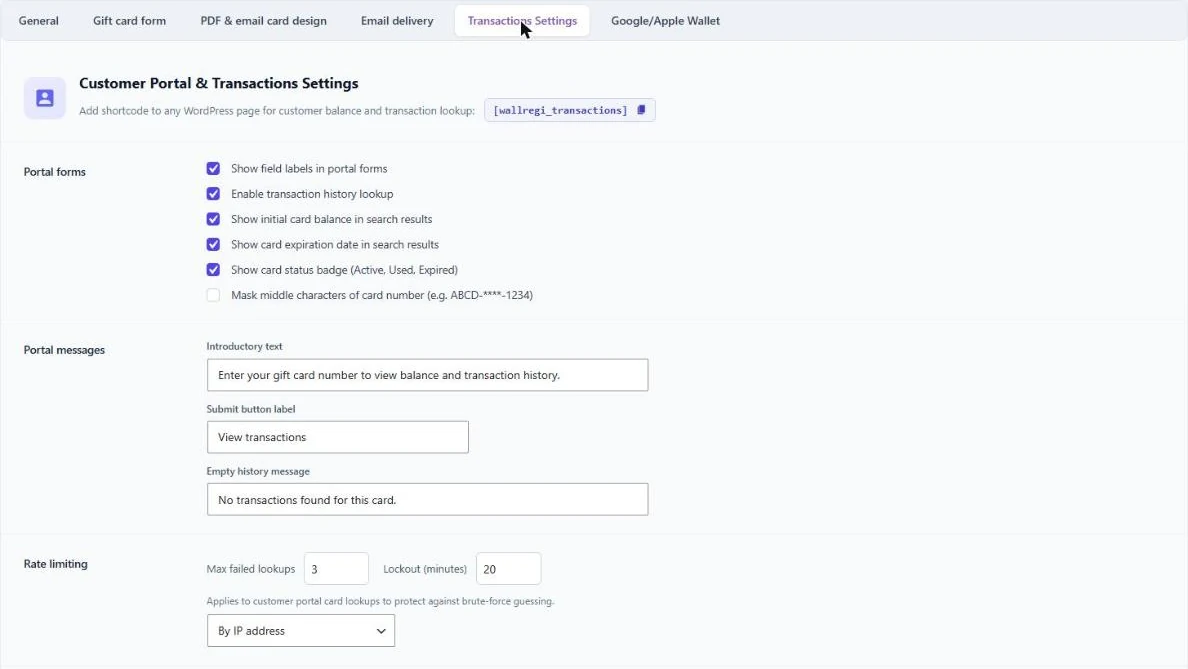
| Transactions and balance lookup page | A page with the [wallregi_transactions] shortcode where a visitor checks a balance. |
| Partial redemption amount | The buyer chooses how much of a card to use on an order. |
| Advanced order rules | Limits such as cards per order and minimum or maximum redemption. |
| Buyer image upload | Buyers add their own photo to a card, with optional ClamAV scanning. |
| Greeting presets and AI writing assistant | Ready-made messages, plus suggestions that use your own AI provider key. |
| Expiry reminder emails | Customers get a reminder before a card expires. |
| Outstanding balance export | A CSV of unspent balances for accounting. |
| REST API and bigger CSV import | Look up cards by code, and import up to 5,000 rows. |
| SMS delivery | A separate add-on sends the card by SMS through Twilio. |
SMS delivery is a separate paid add-on (Twilio), not part of Pro.
Balance and value: top-ups, bonus and lookup
Top-ups keep money in your store
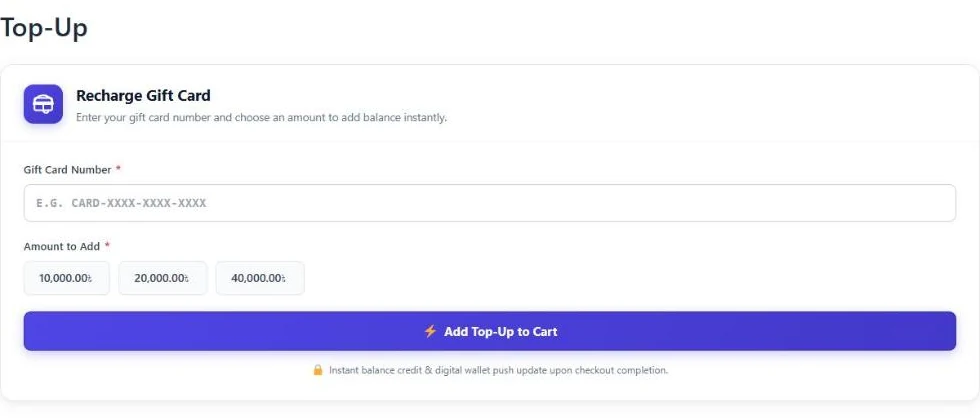
A customer who has a card with a small balance can add more instead of starting again. On our test store, the Top-Up page asks for the card number and an amount, then adds the top-up to the cart. The amounts are set by the store owner. For the full picture, see reloadable gift cards in WooCommerce.
GiftRocketWP Pro features for balance lookup
The lookup page lets a visitor check a card without logging in. In the settings you choose what the result shows: initial balance, expiration date and a status badge. You can also mask the middle of the card number, and set limits on failed lookups. See gift card balance check in WooCommerce for the customer view.
Personalisation and checkout control
Buyer image upload and greeting presets make a card feel like a present. The AI writing assistant can suggest, improve or translate a greeting. It uses your own OpenAI, Anthropic, Gemini or OpenRouter key, so any API cost comes from that provider. Our guide on personalized gift cards in WooCommerce covers the free parts too.
At checkout, Pro lets the buyer choose a partial redemption amount and lets you set order rules, such as the most cards per order.
Admin and data
- Expiry reminders. A reminder email before a card expires, with an unsubscribe link.
- Liability export. A CSV of outstanding balances, handy when you close the books.
- REST API. Look up a card and its transactions from another system.
- Bigger imports. Up to 5,000 rows per CSV file instead of 500.
Who should look at Pro
The free plugin is enough if you only sell cards and let customers use them. Look at Pro if you want customers to reload cards, reward bigger top-ups, let visitors check a balance on a normal page, or keep a clean record of unspent balances.
GiftRocketWP Pro is 40% off from Nov 11 to Nov 30, 2026. The offer ends on Nov 30. We have not tested Pro end to end. The details follow the plugin documentation and the Top-Up and Transactions screens shown here, so try the ones you care about on a staging site first. See the free and Pro features page for the current list.
FAQ
What are the main GiftRocketWP Pro features?
Top-up products, bonus value tiers, a balance lookup page, partial redemption, buyer image upload, greeting presets, an AI writing assistant, expiry reminders, an outstanding balance export, a REST API. SMS delivery is a separate add-on.
Is the AI writing assistant included?
It is a Pro feature. It uses your own API key from OpenAI, Anthropic, Gemini or OpenRouter, so the provider charges for usage.
Can I try the free plugin first?
Yes. The free plugin on WordPress.org covers selling, scheduled delivery, PDF cards and redemption.
Until when is the Pro offer available?
GiftRocketWP Pro is 40% off from Nov 11 to Nov 30, 2026.
Compare free and Pro
Install the free GiftRocketWP plugin, or see GiftRocketWP for WooCommerce.