

Store credit lets you refund customers to a gift card instead of their card or bank, so the money stays in your shop.
Issuing Store Credit Manually
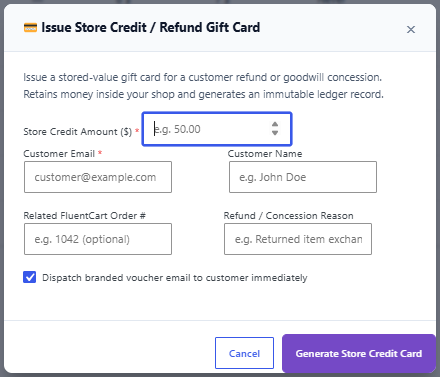
- Go to GiftRocket > Dashboard and click Store Credit.
- Enter the Store Credit Amount and the Customer Email.
- Optionally add the Customer Name, the Related FluentCart Order # and a Refund / Concession Reason.
- Leave Dispatch branded voucher email to customer immediately ticked to email the card right away.
- Click Generate Store Credit Card.
The new card appears in your gift card list with the product title Store Credit Refund, no expiry date, and a balance history entry with your reason.
Automatic Store Credit on Refunds
Go to GiftRocket > Settings > Pro Settings > Store Credit & Refunds and tick Automatically issue store credit when a FluentCart order is refunded.
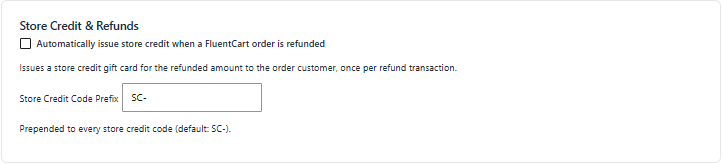
- Every FluentCart refund (full or partial) creates a store credit card for the refunded amount and emails it to the order’s customer.
- Each refund transaction is only credited once.
Note: Automatic store credit is issued in addition to the refund you make in FluentCart. If you want to give store credit instead of money back, record the refund in FluentCart without sending the money back through your payment gateway, or issue the store credit manually.
Store Credit Code Prefix
Store credit codes start with SC- by default, followed by 12 random characters. Change it in Store Credit Code Prefix.
