

Create hundreds or thousands of gift card codes at once, for corporate gifts, promotions or printed vouchers.
Generating Codes
- Go to GiftRocket > Dashboard and click Bulk Generator.
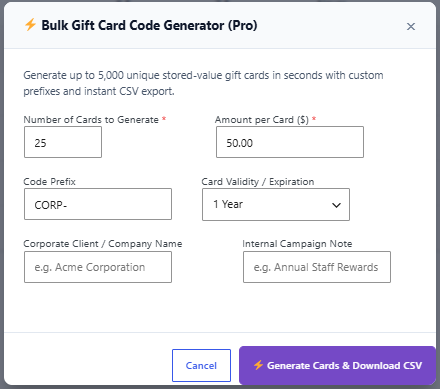
- Fill in the form:
• Number of Cards to Generate – 1 to 5,000.
• Amount per Card.
• Code Prefix – for exampleCORP-.
• Card Validity / Expiration – No Expiration, 1, 3 or 6 months, 1 year (default) or 2 years from today.
• Corporate Client / Company Name (optional) – used as the recipient and card name.
• Internal Campaign Note (optional). - Click Generate Cards & Download CSV. The CSV file downloads automatically.
What’s in the CSV
- Card Code, Initial Balance, Currency, Expiration Date.
- Redemption Link – a link that applies the code and sends the customer to your cart, checkout or shop (based on your apply redirect setting).
Good to Know
- Bulk cards are not emailed. Share the codes yourself, for example by printing them or sending them to your client.
- The download link in the success message works for one hour.
- All generated cards appear in your gift card list and can be managed like any other card.
Tip: For very large batches on slower hosting, generate a few smaller batches (for example 1,000 at a time) instead of one huge batch.
