

Customers can see all their gift cards, balances and expiry dates in one place, and apply a card to checkout with one click.
Where Customers Find It
- A My Gift Cards tab is added to the FluentCart customer account page automatically.
- You can also show it on any page with the
[giftrocket_my_cards]shortcode.
Customers must be logged in. Logged-out visitors see a button to log in to their account.
What Customers See
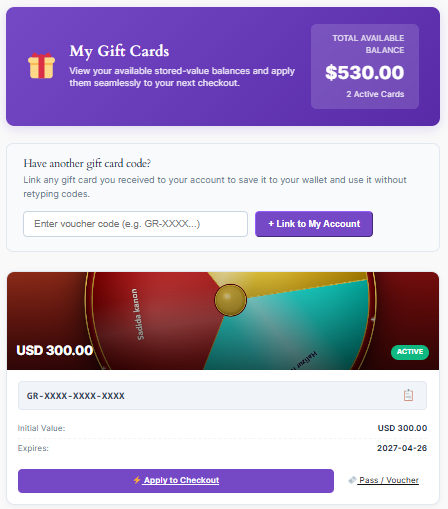
- Total Available Balance across all active cards.
- One tile per card with the design, balance, status, code (with a copy button), initial value and expiry date.
- Apply to Checkout – applies the code and takes the customer to checkout.
- Pass / Voucher – opens the printable voucher (and the wallet pass, if Epasscard is connected).
Which Cards Are Shown
- Cards sent to the customer’s email address.
- Cards bought by the customer.
- Cards the customer linked to their account.
Linking a Card
Customers who received a card at another email address can enter the code under Have another gift card code? and click + Link to My Account.
Note: A card that is already linked to another customer cannot be linked again. To prevent guessing, linking is limited to 10 attempts per 15 minutes.
