

Most Pro options live on one Pro Settings tab. Pro also adds three tools to the GiftRocket dashboard toolbar.
The Pro Settings Tab
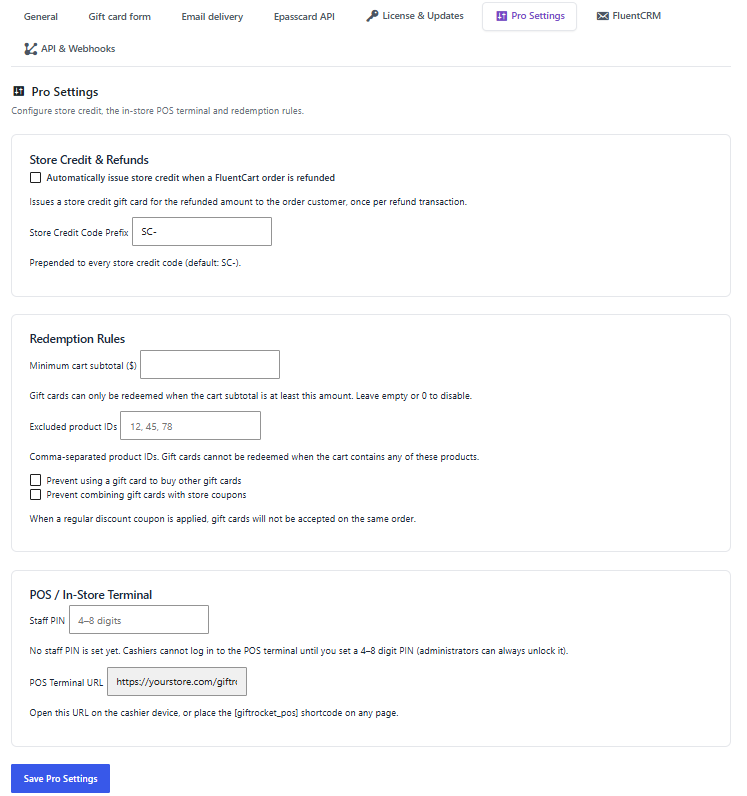
Go to GiftRocket > Settings > Pro Settings. The tab only appears while your license is active. It has three cards:
- Store Credit & Refunds – automatic store credit on refunds and the store credit code prefix. See 13.1 Issuing Store Credit.
- Redemption Rules – when gift cards may be used at checkout. See 12.3 Redemption Rules.
- POS / In-Store Terminal – the staff PIN and terminal address. See 14.1 In-Store POS Terminal.
Change what you need and click Save Pro Settings.
Other Pro Settings Tabs
- FluentCRM – contact sync, tags and low-balance alerts. See 16.1 FluentCRM.
- API & Webhooks – REST API key and outgoing webhooks. See 16.2 REST API & Webhooks.
New Dashboard Buttons
On GiftRocket > Dashboard, Pro adds three buttons next to Create Giftcard:

- Store Credit – issue a store credit gift card to a customer (13.1).
- Bulk Generator – create many codes at once and download them as CSV (13.2).
- Card Designs – manage your extra card artwork (13.3).
