

Connect GiftRocket to other systems, such as a POS, mobile app, ERP, Zapier or Make, with a secure REST API and signed webhooks.
Turning On the API
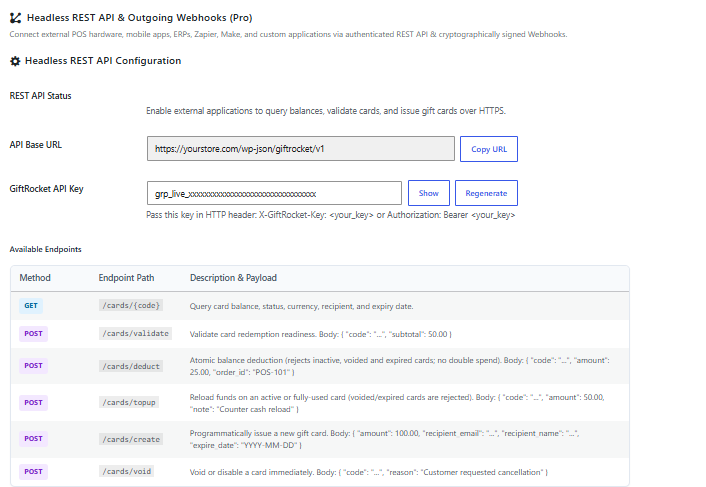
- Go to GiftRocket > Settings > API & Webhooks.
- Turn on REST API Status.
- Copy the API Base URL and the GiftRocket API Key. Click Regenerate to create a new key.
- Click Save API & Webhook Settings. A new or regenerated key only works after you save.
Authentication
Send your key with every request in the X-GiftRocket-Key header (or Authorization: Bearer <key>). Keep the key secret – anyone with it can create and spend gift cards.
curl https://yourstore.com/wp-json/giftrocket/v1/cards/GR-XXXX-XXXX-XXXX \
  -H "X-GiftRocket-Key: YOUR_API_KEY"
Endpoints
All endpoints start with /wp-json/giftrocket/v1.
GET /cards/{code}– balance, status, currency, recipient and expiry date of a card.POST /cards/validate– check whether a card can be used. Body:code, optionalsubtotal. Returns the amount that can be applied.POST /cards/deduct– spend from a card. Body:code,amount, optionalorder_idandnote. Inactive, voided and expired cards are refused, and the balance can never go below zero.POST /cards/topup– add funds to an active or used card. Body:code,amount, optionalorder_idandnote.POST /cards/create– create a card. Body:amount, optionalcustom_code,recipient_name,recipient_email,sender_name,message,expire_date(YYYY-MM-DD) andorder_id.POST /cards/void– disable a card. Body:code, optionalreason.
Note: Cards created through the API are not emailed automatically.
Outgoing Webhooks
- Enter your Destination Webhook URL.
- Keep the Webhook Signing Secret (or set your own).
- Tick the Subscribed Events you need.
- Click Send Test Webhook Ping to check the connection, then save.
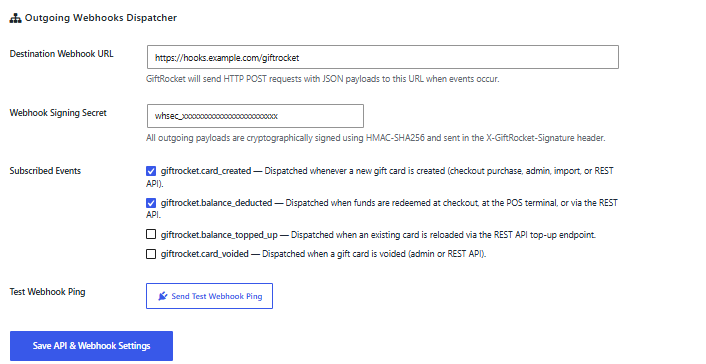
giftrocket.card_created– a new gift card was created.giftrocket.balance_deducted– a card was used at checkout, on the POS terminal or through the API.giftrocket.balance_topped_up– a card was topped up.giftrocket.card_voided– a card was voided.
Verifying Webhooks
Each webhook is a JSON POST with event, timestamp, site_url and data. The X-GiftRocket-Signature header contains sha256= followed by an HMAC-SHA256 of the raw request body, signed with your secret. Compare it with your own calculation before trusting the request.
Tip: Webhooks are sent once with a 5-second timeout and are not retried, so make your endpoint respond quickly.
