

Sync gift card buyers and recipients to FluentCRM, tag them automatically and send low-balance reminders.
FluentCRM must be installed and active (the free version is enough). Then go to GiftRocket > Settings > FluentCRM.

Contact Sync
- Automatically sync Gift Card Purchasers to FluentCRM – when an order containing a gift card is paid, the buyer is added or updated and given the Tag for Purchasers (default Gift Card Buyer).
- Automatically sync Gift Card Recipients to FluentCRM – when a gift card email is sent, the recipient is added and given the Tag for Recipients (default Gift Card Recipient).
- Tags are created automatically if they don’t exist. New contacts are added as subscribed; existing contacts keep their current status.
Low-Balance Alerts
Remind customers to use or top up a card when its balance gets low. This works with the free version of FluentCRM.
- In GiftRocket > Settings > FluentCRM, set the Low Balance Alert Threshold (default 10.00; 0 turns it off) and click Save FluentCRM Settings.
- In FluentCRM, go to Automations and click New Automation.
- Choose the GiftRocket category and select the Gift Card Balance Is Low trigger.
- Add a Send Email action with your reminder. Use the smart codes below to show the code and remaining balance.
- Publish the automation.
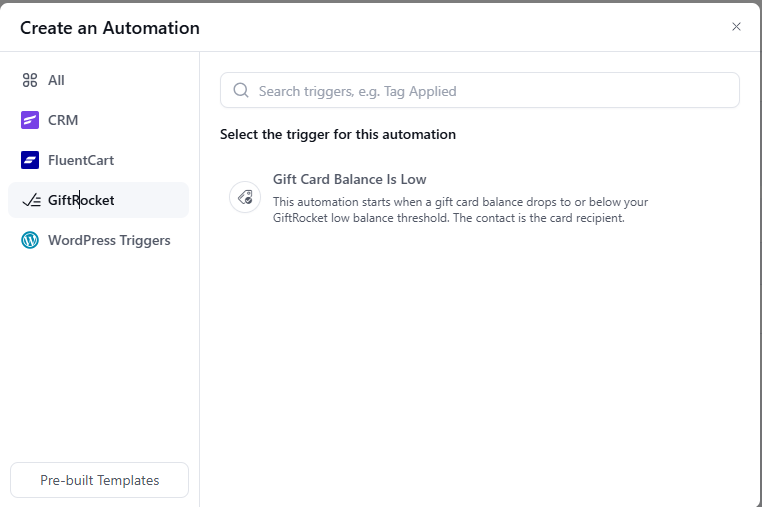
When a purchase, POS sale or API deduction brings a card’s balance down to the threshold or below (but not to zero), the automation starts for the card’s recipient. If the recipient is not a FluentCRM contact yet, they are added automatically. Each card triggers it once, and a second card that runs low starts the automation again.
The card holder also gets the Tag for Low Balance Card Holders (default Low Gift Card Balance), which you can use to filter contacts or segments.
Tip: Prefer tag-based automations? With FluentCRM Pro you can also use the Tag Applied trigger on the low balance tag.
Smart Codes for FluentCRM Emails
Use these in FluentCRM emails. They show the details of the cards sent to the contact’s email address:
{{giftrocket.latest_code}}– the most recent card code{{giftrocket.latest_balance}}– its balance{{giftrocket.latest_expire_date}}– its expiry date{{giftrocket.total_balance}}– the total balance of all active cards{{giftrocket.active_cards_count}}– the number of active cards
Click Save FluentCRM Settings when you are done.
