

The GiftRocket dashboard is where you see and manage every gift card your store has sold or created. Open it from GiftRocket in the WordPress sidebar.
How to Open the Dashboard
Step 1: Go to GiftRocket
- Click GiftRocket in the WordPress sidebar.
- The Dashboard tab opens and shows the All Gift Cards table.
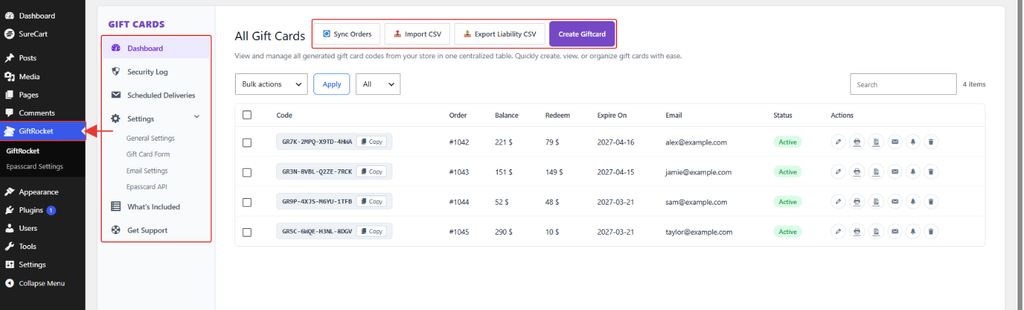
Step 2: Get to Know the Layout
- Left menu: Dashboard, Security Log, Scheduled Deliveries, Settings (General Settings, Gift Card Form, Email Settings, Epasscard API), What’s Included and Get Support.
- Top buttons: Sync Orders, Import CSV, Export Liability CSV and Create Giftcard.
- Gift card table: each row shows the code, order, remaining balance, amount redeemed, expiry date, recipient email and status.
- Actions: the icons at the end of each row let you edit, print, view history, resend the email and more.
Note: Managing gift cards from this table is covered in detail in section 5, Managing Gift Cards.