

GiftRocket creates long random codes that are hard to guess. You can change their length and pattern.
How to Configure
Step 1: Open Limits & Formatting
- Go to GiftRocket → Settings → General Settings → Limits & formatting.
Step 2: Set the Code Pattern
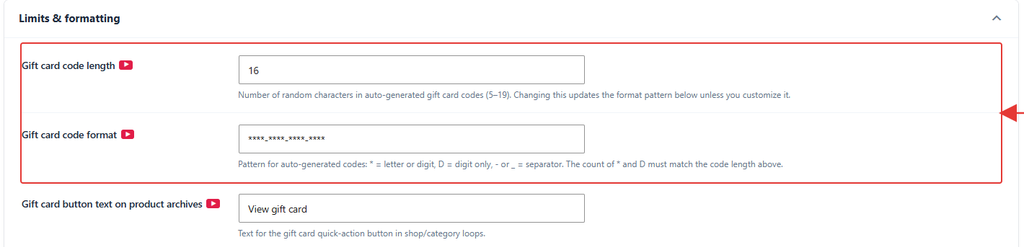
- Set Gift card code length. The default is 16 characters. Changing it updates the format below.
- Edit Gift card code format if you want a custom pattern.
- Click Save Settings.
Pattern Characters
| Character | Means |
|---|---|
* | A random letter or number |
D | A random number |
- or _ | A separator |
| Anything else | Used as-is, for example a prefix |
Example: GR-****-****-**** creates codes like GR-7KQ2-M9TX-4HWA.
Note: Random * characters never use 0, 1, I or O, so codes are easy to read. Keep at least 12 random characters to make codes hard to guess. New settings only affect new cards.