


The Product Type setting decides whether a SureCart product sells as a normal product or as a GiftRocket gift card. Once it is set to gift card, the product page shows the gift card customizer.
How to Configure
Step 1: Open the Product
- Go to SureCart → Products and click the product you want to change.
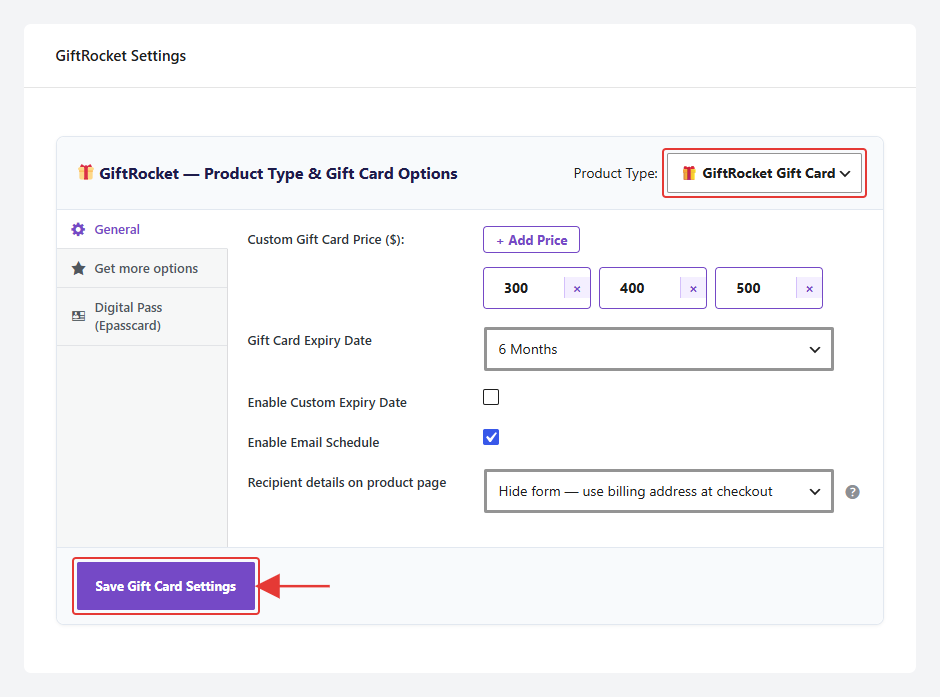
- Scroll down to the GiftRocket Settings card.
Step 2: Change the Product Type
- Open the Product Type dropdown.
- Choose GiftRocket Gift Card. The gift card options appear underneath.
- Click Save Gift Card Settings.
Note: To turn the product back into a normal product, choose Standard Product and save. Gift cards already sold keep working.