

Customers can buy the same gift card for several people in one order, for example a team, a family or a group of friends. Each person gets their own card and their own email. There’s nothing to set up: the option appears on every gift card product once Pro is active.
How Customers Use It
- On the product page, the customer chooses an amount and a design as usual.
- They fill in the first recipient in the normal recipient fields. This person is Recipient #1.
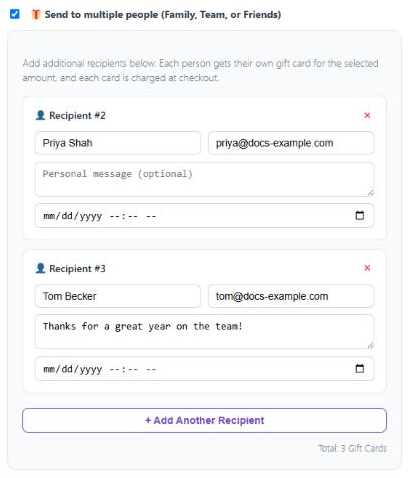
- They tick Send to multiple people (Family, Team, or Friends). A Recipient #2 row appears.
- For each extra person they enter a name and email, and can add a personal message and a delivery date.
- They click + Add Another Recipient for more people. The total at the bottom shows how many cards will be bought.
- They click Add to Cart and pay at checkout.
What Happens After Checkout
- Every recipient is a separate gift card in the order, charged at the selected amount.
- Each recipient gets their own code by email straight after payment, or on the delivery date chosen for them.
- All cards use the same amount, design and sender name. A recipient without their own message gets the message from the main form.
Note: While sending to multiple people, the quantity selector is hidden because the number of recipients sets the quantity. Customers can remove a row with the × button.