

Customers redeem a gift card on your normal SureCart checkout. They enter the code and the balance comes off the order total straight away.
How Customers Redeem a Gift Card
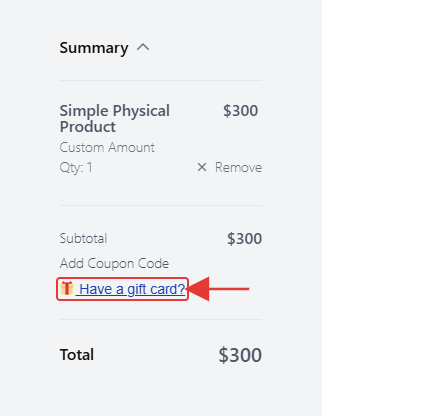
Step 1: Open the Gift Card Field
- In the checkout summary, the customer clicks Have a gift card?.
[S
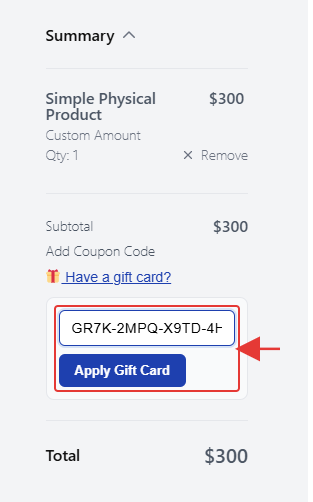
Step 2: Enter the Code
- They type the code in Enter Gift Card Code.
- They click Apply Gift Card or press Enter.
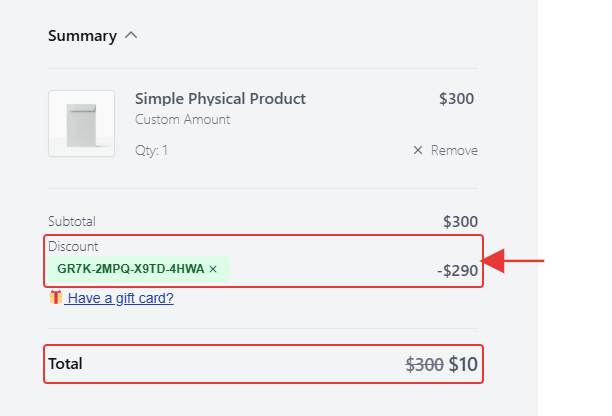
Step 3: Check the Discount
The code appears under Discount and the total goes down by the card’s balance, up to the order total.
Note: One gift card can be used per order. If the code is wrong, expired or has no balance left, the customer sees a message explaining why. There’s nothing to set up: the gift card field appears on your SureCart checkout automatically.