


The icons at the end of each row give you quick actions for a single card.
Row Actions
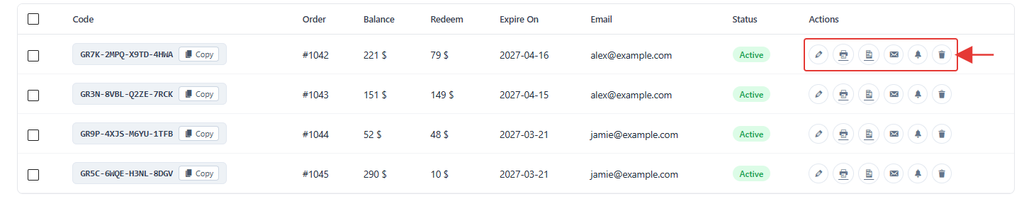
- Pencil (Edit Gift Card): change the card and see its history (see 5.3).
- Printer (Download / Print PDF Voucher): opens a printable voucher. Click Print / Save as PDF to print it or save it as a PDF.
- Page (View Card Details): shows the card as it looks on the product page.
- Envelope (Resend Gift Card Email): sends the gift card email to the recipient again.
- Bin (Delete Gift Card): deletes the card permanently after you confirm.
Note: Resending needs a recipient email on the card. If the email doesn’t arrive, check your WordPress mail settings or an SMTP plugin.