


The REST API lets other systems, such as a till, an app or an automation tool, check, use and issue gift cards.
Turn On the API
- Go to GiftRocket → Settings → API & Webhooks.
- Switch on REST API Status.
- Copy the API Base URL and the GiftRocket API Key (click Show).
- Click Save API & Webhook Settings. The key only works after you save.
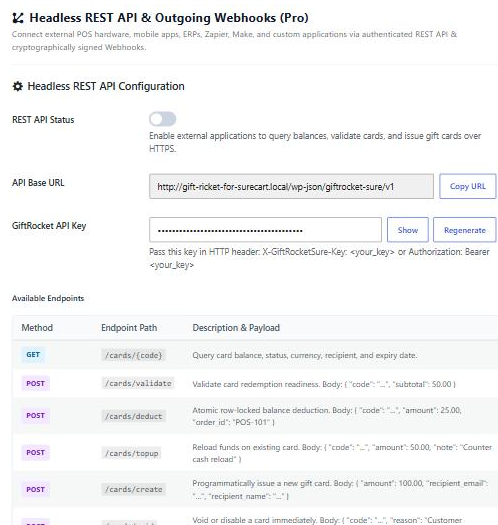
Note: Keep the key secret. Regenerate creates a new key and the old one stops working once you save.
Authentication
Send the key in a header with every request:
X-GiftRocketSure-Key: your_api_key
# or
Authorization: Bearer your_api_key
Endpoints
All paths start with https://yoursite.com/wp-json/giftrocket-sure/v1.
| Method | Path | Does | Body |
|---|---|---|---|
| GET | /cards/{code} | Get a card’s balance, status, currency, recipient and expiry | None |
| POST | /cards/validate | Check whether a card can be used and how much applies | code, subtotal |
| POST | /cards/deduct | Take an amount from a card | code, amount, order_id, note |
| POST | /cards/topup | Add an amount to a card | code, amount, order_id, note |
| POST | /cards/create | Issue a new card (no email is sent) | amount, recipient_name, recipient_email, custom_code, expire_date, message |
| POST | /cards/void | Disable a card | code, reason |
| GET | /system/ping | Check the connection and your key | None |
Example
curl -X POST https://yoursite.com/wp-json/giftrocket-sure/v1/cards/deduct \
  -H "X-GiftRocketSure-Key: your_api_key" \
  -H "Content-Type: application/json" \
  -d '{"code":"A4PS-UL3E-7MXH-LJ4P","amount":20,"order_id":"TILL-1042"}'
A successful deduction returns balance_before, balance_after and the card’s new status.
Errors
| Status | Code | Meaning |
|---|---|---|
| 401 | giftrocketsure_invalid_api_key | The key is missing or wrong. |
| 403 | giftrocketsure_api_disabled | REST API Status is switched off. |
| 404 | card_not_found | No card has this code. |
| 400 | insufficient_balance | The card has less than the amount requested. |
| 400 | card_not_active | The card is used up, expired or disabled. |