

Add gift card buyers and recipients to FluentCRM with tags, and tag cardholders when their balance runs low so you can send a reminder. Requires the FluentCRM plugin.
Set Up
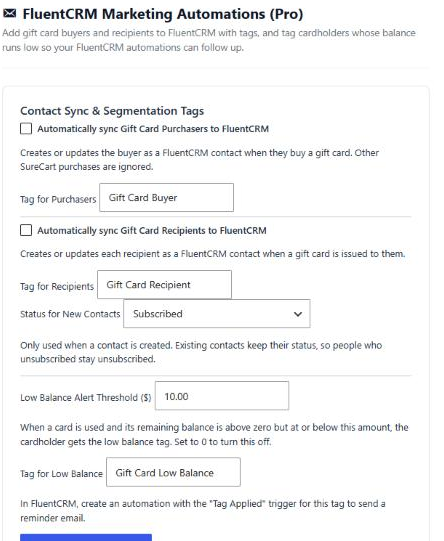
- Go to GiftRocket → Settings → FluentCRM.
- Tick Automatically sync Gift Card Purchasers to FluentCRM and set the Tag for Purchasers.
- Tick Automatically sync Gift Card Recipients to FluentCRM and set the Tag for Recipients.
- Choose the Status for New Contacts: Subscribed, Pending (FluentCRM sends its double opt-in email) or Transactional.
- Set the Low Balance Alert Threshold and the Tag for Low Balance.
- Click Save FluentCRM Settings.
How Contacts Are Added
- Buyers are added when they buy a gift card. Other SureCart purchases are ignored.
- Recipients are added when a gift card is issued to them.
- Existing contacts keep their status, so people who unsubscribed stay unsubscribed.
Low Balance Reminders
When a card is used and its remaining balance is above zero but at or below your threshold, the cardholder gets the low balance tag. In FluentCRM, create an automation with the Tag Applied trigger for that tag to send them a reminder.
SmartCodes for FluentCRM Emails
Use these in FluentCRM emails. They show the contact’s most recent active gift card.
| SmartCode | Shows |
|---|---|
{{giftrocketsure.card_code}} | Gift card code |
{{giftrocketsure.card_balance}} | Remaining balance |
{{giftrocketsure.expire_date}} | Expiry date |
{{giftrocketsure.redeem_url}} | 1-click link that applies the card |