

Pro adds its tools to the screens you already use.
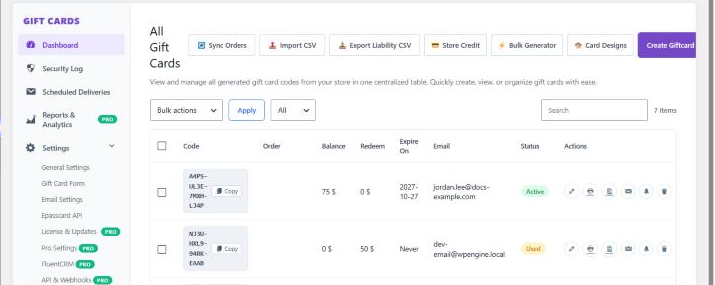
Dashboard Buttons
Go to GiftRocket → Dashboard. Three buttons are added to the toolbar above All Gift Cards:
- Store Credit: issue a gift card as a refund or goodwill gesture (14.1).
- Bulk Generator: create many cards at once (14.2).
- Card Designs: add your own card artwork (13.2).
Sidebar and Settings
- Reports & Analytics: sales, redemptions and balances (15.1).
- Settings → Pro Settings: store credit, redemption rules, balance top-up and the POS staff PIN.
- Settings → FluentCRM: contact sync and tags (15.3).
- Settings → API & Webhooks: REST API key and webhook URL (15.4, 15.5).
- Settings → License & Updates: your Pro license (12.2).
Shortcodes
| Shortcode | Shows | Article |
|---|---|---|
[giftrocket_my_cards] | The customer’s gift cards and balances | 13.4 |
[giftrocket_topup] | The form for adding money to a card | 13.3 |
[giftrocket_pos] | The staff POS terminal | 14.4 |