

Store credit is a gift card you give a customer instead of a cash refund, or as a goodwill gesture. The money stays in your store and the customer can spend it like any gift card.
Issue Store Credit
- Go to GiftRocket → Dashboard and click Store Credit.
- Enter the Store Credit Amount and the Customer Email.
- Optionally add the Customer Name, the Related SureCart Order # and a Refund / Concession Reason.
- Leave Dispatch branded voucher email to customer immediately ticked to email the card now.
- Click Generate Store Credit Card.
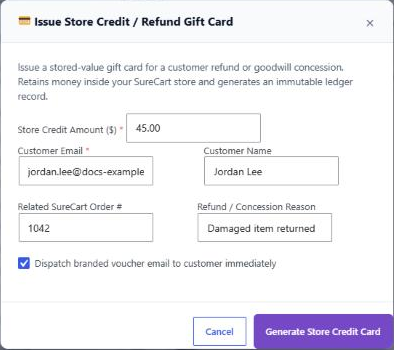
The new card appears in All Gift Cards with a code such as SC-NQQYY7SRLADO. It has no expiry date, and its history records the order number and reason. The email uses your normal gift card email template (see 6.1).
Store Credit Settings
Go to GiftRocket → Settings → Pro Settings and find Store Credit.
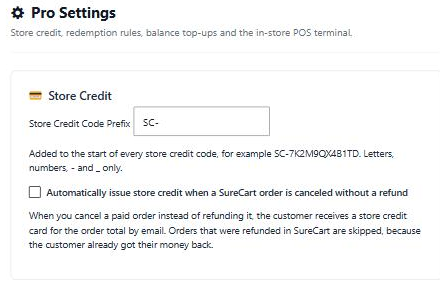
- Store Credit Code Prefix: the start of every store credit code. The default is
SC-. - Automatically issue store credit when a SureCart order is canceled without a refund: when you cancel a paid order in SureCart, the customer receives store credit for the order total by email.
Note: Orders that were refunded in SureCart are skipped, because the customer already has their money back. If you want to refund and cancel the same order, refund it first.