

Webhooks send a message to another system, such as Zapier, Make or your own app, when something happens to a gift card.
Set Up
- Go to GiftRocket → Settings → API & Webhooks and scroll to Outgoing Webhooks Dispatcher.
- Paste the address that should receive the messages into Destination Webhook URL.
- Copy the Webhook Signing Secret into the receiving system.
- Tick the Subscribed Events you want.
- Click Send Test Webhook Ping to check the connection, then Save API & Webhook Settings.
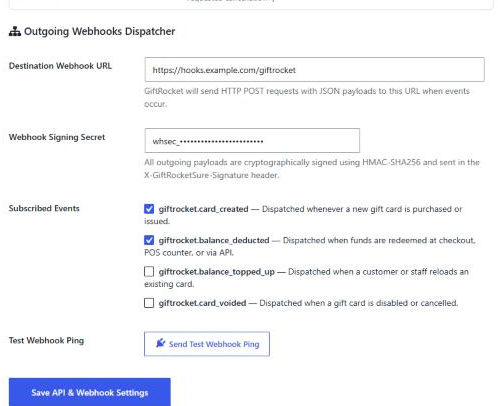
Events
| Event | Sent when |
|---|---|
giftrocket.card_created | A card is issued through the API. |
giftrocket.balance_deducted | Money is taken from a card at the POS or through the API. |
giftrocket.balance_topped_up | A card is topped up on the top-up page or through the API. |
giftrocket.card_voided | A card is disabled through the API. |
Message Format
{
  "event": "giftrocket.balance_deducted",
  "timestamp": 1793000000,
  "site_url": "https://yoursite.com",
  "data": { "code": "A4PS-UL3E-7MXH-LJ4P", "deducted": 20, "new_balance": 55, "order_id": "TILL-1042" }
}
Check the Signature
Each message has an X-GiftRocketSure-Signature header containing sha256= followed by an HMAC-SHA256 of the raw body, made with your signing secret. Reject messages where it doesn’t match:
$payload   = file_get_contents( 'php://input' );
$expected  = 'sha256=' . hash_hmac( 'sha256', $payload, 'your_signing_secret' );
$signature = $_SERVER['HTTP_X_GIFTROCKETSURE_SIGNATURE'] ?? '';

if ( ! hash_equals( $expected, $signature ) ) {
    http_response_code( 401 );
    exit;
}
Note: Messages are sent once and aren’t retried, so reply with a 2xx status quickly. Store purchases and checkout redemptions don’t send webhooks.