

Change a card’s balance, status, expiry date or recipient, and see every transaction on the card.
How to Configure
Step 1: Open the Card
- Go to GiftRocket → Dashboard.
- Click the pencil icon (Edit Gift Card) on the card’s row.
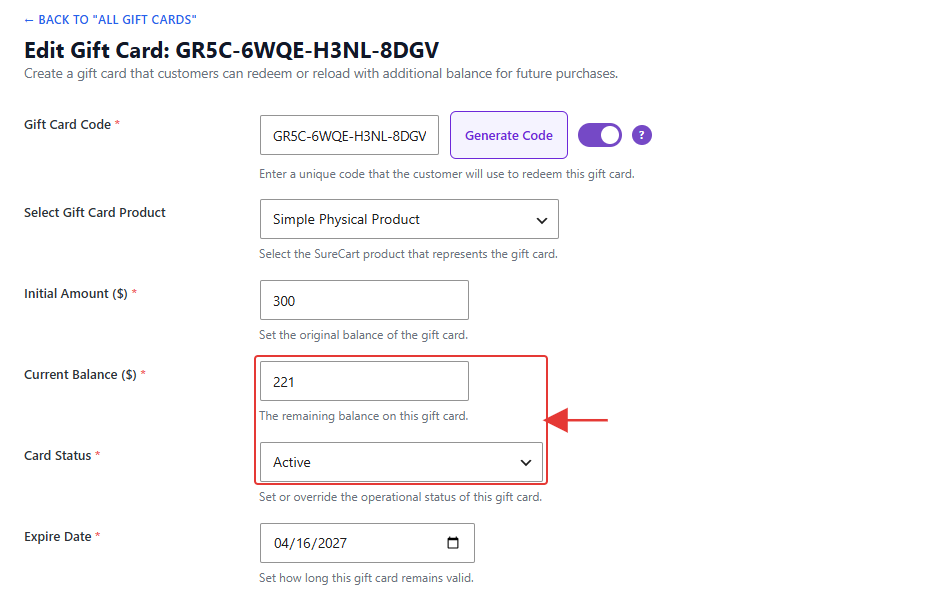
Step 2: Make Your Changes
- Change Current Balance ($) to add or remove credit.
- Change Card Status to Active, Used (Depleted), Expired or Disabled / Voided.
- Change the Expire Date or recipient details if needed.
- Click Update Gift Card.
Step 3: Review the History
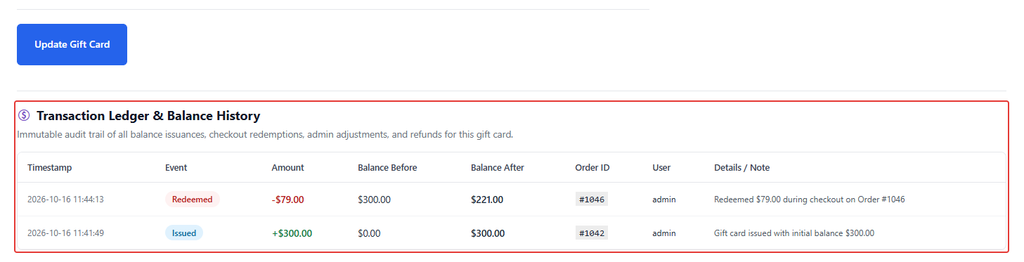
Scroll down to Transaction Ledger & Balance History. It lists every change to the card: when it was issued, each redemption, admin adjustments and refunds, with the balance before and after.
Note: Balance changes you make here are recorded in the history as admin adjustments. Don’t change the code of an existing card; this creates a second card. Create a new card instead.